Lockout A private contract

iPhone · Self-imposed · No account

Your phone should not be stronger than you.

Catch yourself, tap I slipped, and the apps you chose go dark for 24 hours — with no early exit and one way back: movement.

Blocking is enforced by Apple's Screen Time (Family Controls). Lockout receives tokens, not information — it cannot see which apps you have installed or what you do inside them.

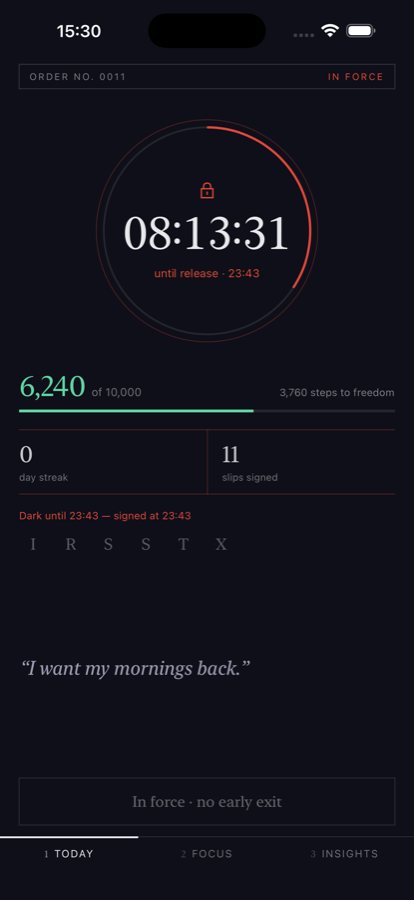
Lockout running on iPhone during an active lockout: a red countdown reading 08:13:31, the line “no early exit”, the user's own note “I want my mornings back”, and a step meter counting down the way out.

Fig. 01 — a sentence in progress, 8 h 13 m remaining

  • No streak guilt
  • No leaderboard
  • No accountability partner
  • No subscription to unlock your own phone

01 — The problem

Attention doesn't get stolen all at once. It leaks.

You picked the phone up to check the time. Eleven minutes later you are deep in a feed you did not choose, and you cannot point to the moment you decided to open it — because there wasn't one. Your thumb got there first.

That gap between intending and doing is not a character flaw. It is the product. Whole teams are paid to make it disappear, and they are good at their jobs.

What breaks is not your afternoon. It is the promise you made yourself this morning.

Lockout does not try to make you want it less. It makes the next hour expensive, and it does that at the level of the operating system, where wanting it less stops being the deciding factor.

  • In the lift.
  • Waiting for the kettle.
  • The forty seconds between sets.
  • Mid-sentence, mid-conversation.
  • 3:14 a.m.

02 — How it works

Three moves. Then it is out of your hands.

  1. 01

    Choose what gets blocked

    Pick the apps and categories from Apple's own picker. Lockout stores an opaque token for each one — it never learns the name, the icon, or a minute of your usage. Then set the terms: how long a sentence runs, and how many steps end it.

    4 selected · stored as tokens

  2. 02

    Tap “I slipped”

    You are the one who logs it — Lockout is not watching. The instant you do, the shields go up and a countdown starts on your Lock Screen. Twenty-four hours by default. Nothing inside the app will hand them back.

    Default 24 h · 1 h and 16 min options exist

  3. 03

    Earn your way back through movement

    Walking to your step goal ends the sentence outright. A recorded workout of thirty minutes or more buys one timed break instead — and when the break runs out, the shields come back on by themselves.

03 — The exit

There is one way out,
and it is on foot.

Most blockers sell you a five-minute override and call it flexibility. Lockout has no override. The only thing that moves the clock is your body — which is why the exit is not a reward animation. It is the mechanism.

00:00the slip 2,000first mile 6,240still short 10,000sentence ends

Path A

Walk it off

Steps counted from the moment you logged the slip are measured against the goal you committed to. Reach it and the lockout ends there and then — not at the top of the hour, not after a review. The apps come straight back.

Default goal
10,000 steps
Configurable
2,000 – 15,000
Counted from
the slip, not midnight

Path B

Bank a workout, buy a break

A recorded workout long enough to qualify can be claimed for one timed break. The shields drop, a second timer starts, and the operating system puts them back when it expires — whether or not you reopen Lockout.

Qualifying workout
30 min or longer
Break earned
30 min (configurable)
Claims per workout
one

The small print, which is the whole point

  • Sensor only Steps typed into the Health app by hand are ignored. Only sensor-recorded samples count toward getting out.
  • Frozen terms Your goal and break length are locked in the second the sentence starts. Lowering them mid-lockout does nothing at all.
  • One claim The same workout cannot be cashed twice, even when a watch and a phone both recorded it.
  • Reconciled When two devices log the same walk, Lockout resolves them to one figure instead of adding them together — so the number that frees you is the number you walked.

Lockout is not a fitness or medical product. It counts steps and workout minutes to decide when a block ends, and reports figures Apple Health already holds. It does not assess your health, offer training advice, or make claims about outcomes.

04 — The app

Built to be looked at once, then obeyed.

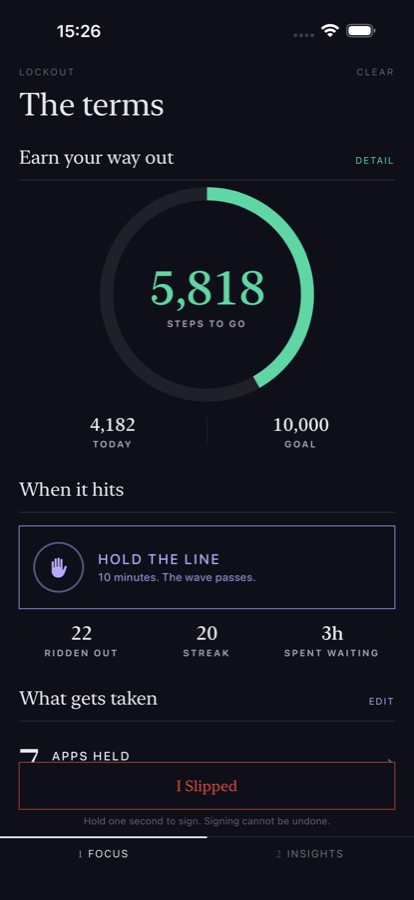
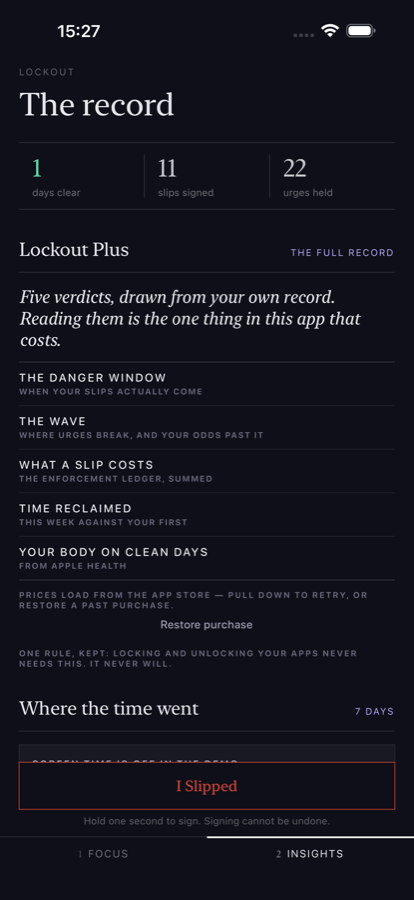
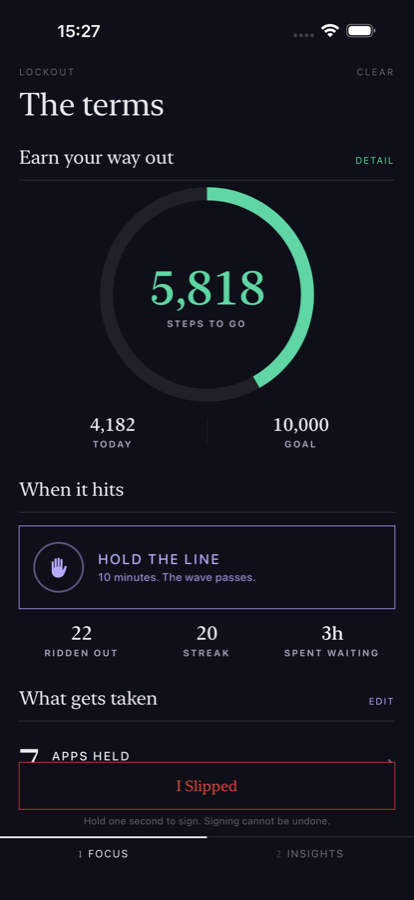
Scroll sideways · four screens from the app

05 — What this is

  • 01No easy exit.
  • 02No motivational spam.
  • 03No shame.
  • 04Just a contract with yourself.

06 — If you already train

The data is already on your wrist.

If you wear an Apple Watch, a Whoop, an Oura ring or a Garmin, those devices already write into Apple Health. Lockout can use the data available there — read-only, and only the types you agree to.

Two of them do real work: steps end a lockout, and workouts buy a break. The rest are reported back to you in your own record, so the argument the app is making — that moving more is worth something — is one you can check rather than take on faith.

iOS asks per data type and you can refuse any of them; what you refuse is simply shown as “—”, and everything else keeps working. Availability depends on what your devices actually write to Apple Health, so this is not a guarantee of compatibility with any particular wearable. Note that Apple Health's heart-rate variability is SDNN, which is a different measurement from the sleep-window figure Whoop shows — the two are not expected to match.

Read from Apple Health

Step count
ends a lockout
Workouts
earns a break
Resting heart rate
reported
Heart rate variability
reported · SDNN
Sleep
reported
Active energy
reported
VO2 max
reported

Read only. Lockout never writes to Health, never puts health data in iCloud, and never uses it for advertising or sale.

07 — Questions

Straight answers.

What happens when I tap “I slipped”?

The shields go up immediately — the apps you selected stop opening, enforced by Apple's Screen Time. A countdown starts and appears on your Lock Screen, and the slip is written to your own history on the device. Twenty-four hours is the default; one hour and a sixteen-minute test setting also exist, so you can prove to yourself that the automatic unlock works before you trust it with a full day.

Can I unlock apps early?

There is no override button, and no amount of tapping produces one. Two things end a lockout: reaching the step goal you committed to, which ends it outright, or claiming a qualifying workout, which buys a single timed break before the shields return on their own.

The settings that decide those terms are frozen the moment a sentence starts, so lowering the goal halfway through changes nothing. One honest limit: iOS lets you revoke Screen Time permission in Settings at any time, and no app can prevent that. Lockout notices when it happens and keeps the receipt in your record.

Does Lockout work without a server?

Yes — completely. There is no account, no sign-in, and no server operated by the developer. Everything runs on your phone.

There is one optional setting where you can enter the address of a server you run yourself if you want your own long-term copy of the data. It is blank by default and nothing is transmitted while it is blank. The backend for it is open source and lives in the same repository as the app.

What permissions are required?

Screen Time (Family Controls) is required — it is what actually blocks the apps. Apple's design means Lockout is handed opaque tokens rather than information: it can shield an app you picked, but it cannot see which apps you have or what you do in them.

Apple Health is optional and read-only, and is only needed for the exercise exit. iOS asks per data type and you can refuse any of them. Notifications are optional too — they carry the countdown and tell you when a break is about to end.

What data is stored?

Your slips and the tags you choose, the urges you ride out on the timer, your lockout history and settings, the note you wrote yourself, the apps you selected as opaque tokens, and any step, workout or recovery figures read from Apple Health. All of it stays in Lockout's private storage on your device. Deleting the app removes all of it.

There are no analytics, no crash reporting, no advertising identifiers and no third-party SDKs of any kind. The full text is in the privacy policy.

Is there a free or paid plan?

The whole lockout mechanic is free, forever: choosing your apps, signing a slip, walking your way out, the auto-ban, holding the line. Locking and unlocking your own phone is never the part you pay for.

Lockout Plus is optional — £1.99 a month or £9.99 once — and it unlocks the record: your danger window, where your urges break and your odds of riding past them, what a slip has cost you, the time you've reclaimed, and how your body reads on clean days versus the mornings after. Analysis, never the blocking. Let a subscription lapse and you lose the charts, never a way out of a shield.

Is Family Controls approval required for the App Store version?

Yes. Shielding another app's content needs a distribution entitlement that Apple grants case by case, and without it a Screen Time app cannot ship. Lockout's was approved on 6 August 2026, so the blocking you have read about here is the real mechanism rather than a plan.

Your phone should not be
stronger than you.

Lockout is in testing on TestFlight and is not on the App Store yet. Leave an address and you will hear when there is a build worth your time — nothing else.

Used only to tell you when early access opens.

Private One address, one purpose: to tell you the day early access opens. No list rental, no other mail, unsubscribe by ignoring it. Trouble with the form? Email kyansukhram@gmail.com.